Sensorycloud.ai Product Demo
Role: UX Consultant / UI Designer

Introduction
Sensorycloud.ia is cloud-based security software that can be added to mobile, desktop, and tablet applications. It enables complete control on the application level, so shared devices or precious applications can be limited to specific users.
Currently, sensorycloud.ai is still in product development, but they are showcasing their technology at conferences around the world. To do so, they needed a demo application that looked and felt as advanced as their recognition software.
Research
Persona
To get started, I interviewed the product team about the type of people they encounter at conferences. Together we were able to come up with a list of common traits amongst those at technology conferences, and what they are looking for in a product.

Competitive Analysis
Additionally, we did a deep-dive on competitors to better understand the market: FaceTec and Applock being our main focus.
Design Requirements
Since this is a demo product, the functionality is limited to demonstrating product accuracy. In this case, a user will create a face/ voice enrollment and then they will test authentication against the enrollment. For example, Jeff would create a face/ voice enrollment (similar to FaceID on the iPhone), and then they would test the accuracy of the software by attempting to trick technology. This could be done by showing another person’s face instead of their own, showing a photo ID, or covering part of their face by putting on glasses. I like to call this the “Jeff, Not-Jeff” test.
Features
-
Simple and intuitive enrollment process
-
A way to capture user’s face (50 frames)
-
Ability to demonstrate liveness of subject
-
View of all enrollments
-
Functionality to authenticate against previous enrollments
-
Unified designs for mobile, tablet, and desktop
Branding & Design System


Final Designs
Enrollment Flow
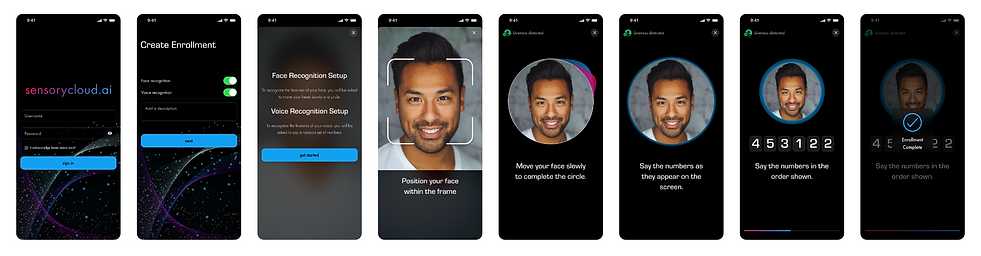
Enrollment can be done in 3 ways: face recognition, voice recognition, or both. Enrollments always require liveness. Liveness means that the technology can detect that the face is three-dimensional (alive) and the voice is human.
For the design, we focused on simple toggle switches to choose the type of enrollment. A description is required so that a more advanced user can save multiple enrollments for specific use cases.
Authentication Flow
Previous enrollments live in a table on the home screen. The enrollments are listed chronologically and delineated by the description provided during the enrollment setup.
To test against previous enrollments, the user must select an enrollment from the list. They will then be prompted to choose from the possible options for authentication. The options for authentication are based on the respective enrollment setup. Once the user chooses the requirements, they will attempt to authenticate the enrollment using face recognition, voice recognition, or both. To demonstrate accuracy, the user will also be encouraged to test the enrollment against other faces, voices, or non-human entities.

Desktop & Tablet
