UX Mapping
Role: UX UI Designer / UX Researcher / Product Designer

Introduction
UX maps can be done in many different ways; empathy mapping, user journey mapping, customer experience mapping, or service blueprints. Each type of map depicts a different process but they all come together to help us build empathy for our users. These are common UX tools that enable teams to evaluate product cycles and the impact on the user so that we can determine areas of opportunity and create a roadmap to improve product design.
Empathy Mapping
An empathy map is a method of articulating what we know about our users. It is a way of externalizing a shared understanding of our user, and aids in future decision making.
To build an empathy map, we used a Miro board for remote collaboration. We divided the grid into 4 sections: Think & Feel, See, Say & Do, and Hear. We created our boards independently, as a way to categorize our user feedback and research notes. Then jumped on zoom to create our collaborative empathy map.
The empathy mapping process naturally forced alignment and understanding of our end-user. By combining our knowledge, we were able to work through the complex emotions and build empathy for our users.
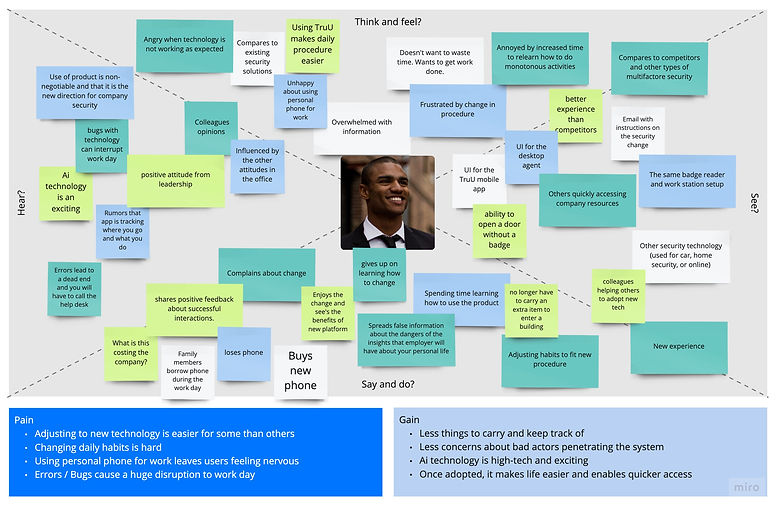
Insights:
-
Adjusting to new technology is easier for some than others
-
Changing daily habits is hard for everyone
-
Using personal phone for work leaves users feeling nervous
-
Disruptions to the work day are experienced exponentially
-
It is beneficial to carry less things (ex/ no badge)
-
Better security relieves the concern around bad actors penetrating the system
-
Ai technology comes with mixed emotions: some users are afraid of the unknown and others are excited about the possibilities that come with advanced technology
-
Life is improved when access is frictionless for the end-user
Experience Mapping
An experience map is a visualization of the end-to-end experience by converging multiple experiences into one map. It provides a broad view of events in chronological order, paired with thoughts and emotions that accompany respective phases or actions. Experience maps are created prior to journey maps to gain insight about general human behavior.

Insights:
-
Security is always a burden
-
Deployment and enrollment is non-intuitive and inconsistent
-
Working condition are not always predictable
-
User’s need to be able to trouble-shoot on their own
-
Job performance is impacted if access is blocked or performance interrupted
-
Product must be intuitive and easy to use
Journey Mapping
A journey map is a visualization of the process that a user goes through in order to accomplish a goal. Journey maps holistic tools that compile user actions into a timeline to understand pain points and areas of opportunity. It provides a narrative that informs the design process from initial product creation to future versioning. Journey maps are iterative and updated to reflect changes in product along with user mindset.
Personas
A persona is the main actor in the map. They are an archetype that represents the data patterns found in my user research. Persona’s put a face and a personality to the experience. They help us relate to the experience by building empathy with the user.

Scenario and Expectations
Setting the scene describes the situation that our journey map is addressing. This helps keep the activity focused on the end-goal for the user. Expectations describe the experience that the user is anticipating going into the scene.
It’s important to create this outline at the beginning of the process, because journey maps get very detailed so this serves as a compass when the details start to get overwhelming.
Journey Phases
Journey phases are high-level stages for the journey. These serve as categories for organizing the actions that the user will perform during the journey.
Actions, Mindsets, and Emotions
This is the breakdown of the activities the user performs along the journey. Each activity is accompanied by thoughts and feelings that help us understand when things are going well and when they are not.
Opportunities
Areas for opportunity are uncovered through insights gained during mapping. Since there is always room for improvement, the map helps teams prioritize changes based on the severity of the situation. Maps clarify when issues block a user from completing a task or cause emotional distress.

Insights:
-
Enrollment should be self-explanatory and easy to execute
-
Product interaction should reflect established behavior in the world
-
Ping pong between devices increases cognitive load
-
Product errors can block a user from performing job duties
-
Disruptions lead to frustrations and potential product abandonment
-
The product need to function faster than a password or badge
-
UI needs to be clean, intuitive, and provide a sense of credibility
Conclusion
Journey mapping helps teams to empathize with users based on real feedback. It enables us to remove our bias and uncover where our product is causing frustrations or failing to meet expectations. Although it can be daunting to expose the negative view of our product, it’s an efficient way to understand where improvements can be made to create a delightful experience for end-users.